Pastily vs Clipdiary
Updated July 2026
 vs
vs
Clipdiary alternative
Best Clipdiary Alternative for Modern Windows 11 Desktops
Compare Clipdiary with Pastily: Discover why a modern visual interface, macOS compatibility, and sequential paste replace a classic Windows tool.
Feature by feature
Clipdiary: Windows only · $19.99 for personal license (free basic home version available)
| Feature | Clipdiary | Pastily |
|---|---|---|
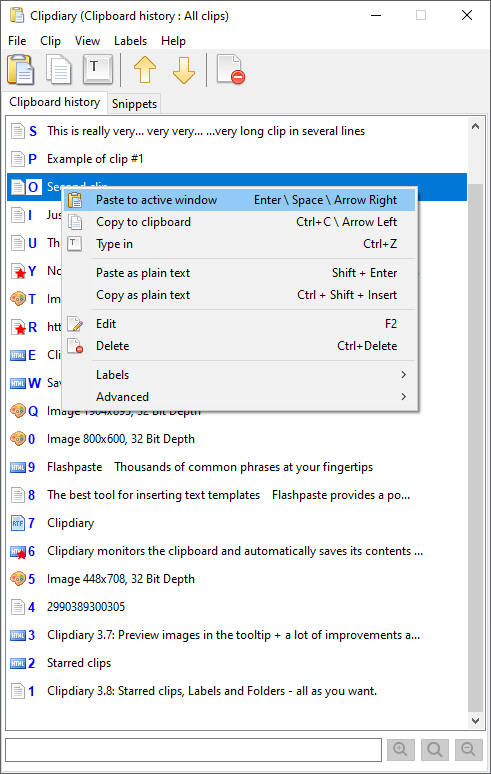
| Modern User InterfacePastily fits perfectly with Windows 11 dark mode; Clipdiary looks outdated. | ✗ (Old Windows grid style) | |
| Platform SupportPastily supports users working across macOS, Windows and Linux. | Windows only | macOS, Windows & Linux |
| Universal Paste QueuePastily allows copying multiple items and pasting them in FIFO order; Clipdiary only allows selecting single items. | ||
| Custom CategorizationPastily lets you group clips into folders with emoji labels. | ✗ (Flat search database) | ✓ (Custom Spaces) |
| Active Memory Footprint (RAM)Both run extremely light in the background tray. | 15MB - 30MB | Under 15MB |
| Pricing ModelPastily is significantly more affordable and offers lifetime upgrades. | $19.99 personal license | $8.99 One-Time Lifetime |
| Image ClipboardPastily keeps every image you copy — screenshots, Figma, the web — with a live preview right in your history. | Unlimited images | |
| 1-Click Image DownloadCopy an image, then save it straight to your Downloads folder from the clip — no app to paste it into first. | Save to disk in one click | |
| Auto-Disappear TimersGive any sensitive clip a self-destruct timer with a live countdown; it is wiped from history when time runs out. | 15s – 24h, plus custom | |
| Colour Hex PreviewCopied colour codes appear as a real swatch, with instant conversion between HEX, RGB and HSL. | Live swatch + HEX · RGB · HSL | |
| Live Clip CounterPastily shows how many clips you have at a glance, updating live as you copy and clear. | Live count in the menu bar |
Strengths & trade-offs
Clipdiary
- Extremely robust database that can store tens of thousands of items
- Support for complex filters (filter by source application, content type)
- Supports automatic database backups
- Outdated design language that looks out of place on Windows 11
- No support for macOS machines
- No built-in sequential paste queue
Pastily
- Gorgeous dark-mode dashboard with smooth animations
- Cross-platform compatibility for Mac, Windows and Linux
- Color-coded Spaces folders to easily organize template folders
- Sequential Universal Paste Queue for faster copying and pasting
- V2: Image clipboard (unlimited), color hex previews, and auto-disappear privacy timers
- Maximum history limit of 2,000 items (Clipdiary can hold larger archives)
- No advanced search filters (e.g. regex searches)
In depth
Brushing Off the Dust: Modern UI vs. 90s Grids
Clipdiary has been around for many years and is highly stable, but its user interface looks like it was designed for Windows 95. The text is cramped, and organizing folders is confusing. Pastily provides a visual breath of fresh air, wrapping a robust database engine inside a clean, modern card interface.
Sequential Pasting vs. Single-Item Selection
Clipdiary allows you to double-click an item in a list to paste it, which is slow for copying and pasting data from forms or code files. Pastily features a built-in **Universal Paste Queue**. You can copy five different form fields in succession and then paste them one-by-one by repeatedly hitting your paste shortcut, saving you from switching windows back and forth.
Questions
Is Clipdiary available on Mac?
No, Clipdiary is strictly a Windows desktop application. Pastily provides a cross-platform alternative that keeps your layout identical across Mac, Windows and Linux.
Does Pastily support hotkeys like Clipdiary?
Yes, Pastily supports customizable hotkeys. You can trigger the main overlay and focus search instantly without clicking your mouse.