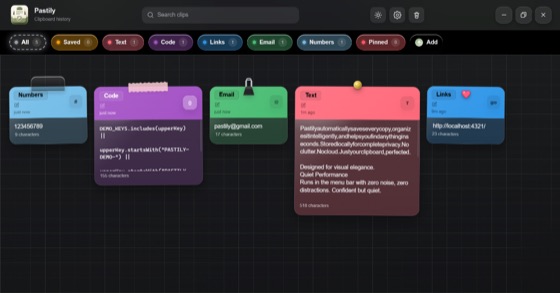
Every copy. Remembered.
Text, links, code, and images — your entire clipboard history, always at hand.
screenshot-2026.png · 1.2 MBImg
Meeting notes — Q3 roadmapText
The minimal, offline clipboard manager for Mac, Windows and Linux.
Text, links, code, and images — your entire clipboard history, always at hand.
Hex codes turn into live swatches with every format ready to copy.
Copied images download straight to disk, with a toast that finds the file.
Passwords and API keys auto-expire on your timer — wiped from RAM and disk.
Every query answers in under a millisecond, even with thousands of clips.
No cloud, no telemetry, no network access. Everything stays on your device.
New in Pastily 2.2
Notch Island turns the notch into a live view of your clipboard: a preview of every copy, your paste queue, auto-delete countdowns and your recent clips on hover.
For MacBooks with a notch. Turn it on or off in Settings or from the menu bar. How Notch Island works

Instant search, auto-expiring clips, one-click image downloads and zero cloud sync — a clipboard that finally keeps up with you.
Download for macOSSee it in action
Colour-coded spaces, pins and stickers, instant search, one-click image saves — and clips that self-destruct on a timer.
Try the live demoBuilt to be trusted
Every macOS build of Pastily is signed with our Apple Developer ID and notarized by Apple — so it opens without warnings, and you know it hasn't been touched since we shipped it.
Signed with our Apple Developer ID, so you know exactly who built it.
Scanned by Apple for malicious code before every release.
Gatekeeper recognises Pastily and opens it straight away.
From the community
Real words from Reddit and X — from the people who tried Pastily first.
Our first paid customer
“Congrats on your first paid customer! I really like your UI. Everything looks clean, polished, and well thought out.”
The paste queue
“Making it visual and having a paste queue is a game changer! I'm used to scrolling through a text list to work out what I accidentally overwrote on my clipboard — keep it up!”
The mascot and micro-animations
“I love the mascot and the micro-animations you've got on the page, Ashfaque!”
One price, no subscription
“Hey there! I'm your third customer. Thanks for building such a cool app and keeping it out of a subscription.”
Design that feels calm
“Amazing work! It feels so smooth and 'pastel'-ly.”
First impressions
“Gorgeous UI!”
Pinning what matters today
“That queue idea is actually nice. The related thing I always want is a way to pin 2 or 3 clips for the day, so they don't get buried under all the random stuff I copy while working.”
Launch day
“Congrats on the launch! Your web design looks incredible.”
Beyond plain text
“I'd love clipboard managers to treat files as first-class citizens instead of just text and images. I move folders, screenshots, PDFs and assets around constantly. This is looking sick so far though!”
The icon
“Congrats bro — I like your logo, it looks premium!”
Worth a try
“Did a quick check and the UI looks impressive. I will install it later this week to test it out!”
Meet the mascot
“Love the landing page. The little rabbit especially, that thing's cute. You should lean into that mascot more.”
A fresh idea
“Def, the frontend is dope and the idea is also pretty unique.”
Love at first sight
“Ohh I was just thinking about something like this but for mobile — super love the idea! I also really love your website!”
After installing
“It's working great so far!”
Craft
“This looks unique and the UI is awesome.”
Execution
“Great idea! And great job implementing it.”
The landing page
“Haven't used the product but loved the landing page.”
The idea
“Congrats, good product idea, well done!”
Keep going
“Amazing! Keep up the good work bro.”
Saved for later
“This looks great! I've saved the post and will be downloading later.”
Straight to the point
“Your product is cool bro.”
Long awaited
“I was waiting for something like this!”
Hot Corners
“Hot Corners — I can't live without them anymore.”
The interface
“Cool UI, mate.”
A great tool
“It looks like a great tool!”
Vibes
“Looks sooooo cool!”
Launch energy
“Wow, must be a rush. So cool — thanks for sharing.”
Community
“Cool project fam.”
On the list
“Definitely gonna try.”
Pastily is 100% offline-first. Your clipboard history, files and images are stored locally in a SQLite database on your own disk. There are no database servers, no telemetry and no account — your data never leaves your device.
Yes. Every macOS build is signed with an Apple Developer ID and notarized by Apple, so Gatekeeper opens it without warnings and you can be sure the app has not been tampered with since we built it.
Pastily is pay once, keep forever. No subscriptions, no hidden fees and no renewals — one purchase gives you lifetime access, including every future update.
Choose how many devices you need at checkout — your single licence key then works on that many computers. Moving to a new machine? Deactivate Pastily in Settings and activate it on the new one.
We want you to love Pastily. If it is not right for you, we offer a 7-day, no-questions-asked refund — just email hi@pastily.app with your licence details.
Pastily runs on macOS, Windows 10/11 and Linux, with the same history, Spaces and Universal Paste Queue on each.
If you want one clipboard manager on all three, Pastily is one of the few that runs natively on macOS, Windows and Linux, works fully offline and is a one-time purchase. Popular single-platform options include Maccy (free, Mac only), Paste (subscription, Apple devices) and Ditto (free, Windows only). See the full side-by-side comparison at pastily.app/alternatives.
Yes. macOS 26 Tahoe added basic clipboard history to Spotlight: press Cmd+Space, then Cmd+4. It keeps copied items for 30 minutes, 8 hours or at most 7 days, and you cannot pin clips to keep them. Pastily keeps up to 2,000 clips, lets you pin snippets, sort them into Spaces and paste several in a row, and works the same on Windows and Linux.
Press Windows key + V. If nothing appears, turn on Clipboard history in Settings > System > Clipboard. The built-in history keeps only the last 25 items and clears everything that is not pinned when you restart. Pastily keeps up to 2,000 clips across restarts, fully offline, and opens with Ctrl+Shift+B.
Everything, with no limits:
Plain text, code (with syntax highlighting), colour codes, emails, phone numbers, links and images. Pastily detects each type automatically and keeps its original formatting intact.
Notch Island is a small panel in the MacBook notch, new in Pastily 2.2. It shows a preview of each thing you copy, your paste queue, and a countdown for clips set to auto-delete. Move the pointer to the notch to see your recent clips and click one to copy it again.
It works on Macs with a notch, and you can turn it off in Settings → General or from the menu bar icon.
Yes — that is the Universal Paste Queue. Queue up several clips, then paste them one by one, in order, into any form, editor or spreadsheet just by pressing your paste key again.
It is keyboard-first. Open the overlay with Cmd+Shift+B on macOS or Ctrl+Shift+B on Windows and Linux, or rebind it to any shortcut you like.
Pin any clip so it is never cleaned up, and sort clips into colour-coded Spaces like "Code templates" or "Support replies" — with stickers, custom names and drag-and-drop ordering.
Up to 2,000 clips, searchable instantly thanks to a local SQLite index. Smart auto-cleanup trims old, unpinned items so Pastily never wastes disk space.
Pricing
One purchase. No subscription. Every feature, and every future update, on as many devices as you need.
$8.99 per device for the first 30 buyers (never more than $19.99) — then from $14.99.
Need more than 20 devices? Contact support at hi@pastily.app.
Secure checkout · Licence key delivered by email · One payment, no renewals