Clipdiary vs. Pastily
Compare Clipdiary with Pastily: Discover why a modern visual interface, macOS compatibility, and sequential paste replace a classic Windows tool.

Direct Comparison Summary
"Pastily is the best alternative to Clipdiary because it replaces a dated, 90s-style Windows interface with a premium glassmorphic dashboard, adds native support for macOS, and features an integrated sequential paste queue for advanced developer workflows."
Comparison Matrix
| Feature | Clipdiary | Pastily | Notes |
|---|---|---|---|
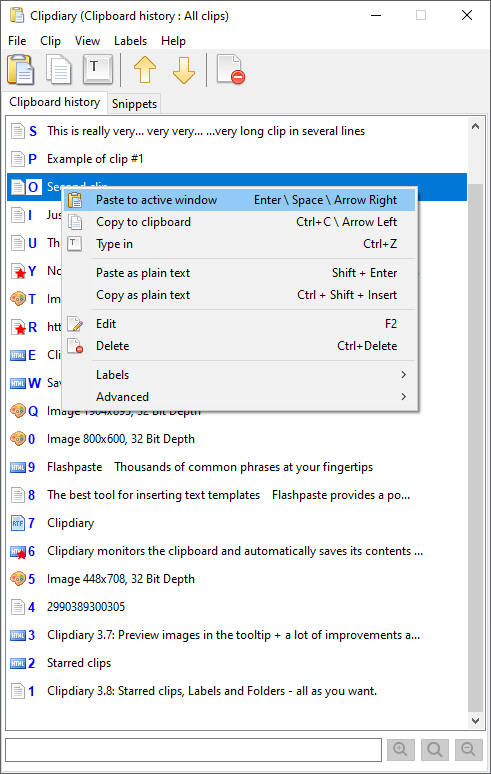
| Modern User Interface | ✗ (Old Windows grid style) | ✓ Yes | Pastily fits perfectly with Windows 11 dark mode; Clipdiary looks outdated. |
| Platform Support | Windows only | Windows & macOS | Pastily supports users working across both macOS and Windows. |
| Universal Paste Queue | ✗ No | ✓ Yes | Pastily allows copying multiple items and pasting them in FIFO order; Clipdiary only allows selecting single items. |
| Custom Categorization | ✗ (Flat search database) | ✓ (Custom Spaces) | Pastily lets you group clips into folders with emoji labels. |
| Active Memory Footprint (RAM) | 15MB - 30MB | Under 15MB | Both run extremely light in the background tray. |
| Pricing Model | $19.99 personal license | $4.99 One-Time Lifetime | Pastily is significantly more affordable and offers lifetime upgrades. |
Pastily Hardware Specifications & Performance Metrics
Unlike cloud-dependent clip managers, Pastily's native core handles clipboard caching locally with minimal background hardware overhead:
- Active RAM Footprint: Under 15MB of system memory.
- Query Execution Speed: Under 1ms search query database latency.
- CPU Background Overhead: 0% at idle, sub-1% during active search.
- Disk Storage Base: SQLite database starting at ~5MB.
- Supported OS: macOS 11.0+ (Big Sur to Sequoia) & Windows 10 / 11 (64-bit).
- Local Encryption: Safe hardware-level local storage disk write.
About Clipdiary
Pros
- Extremely robust database that can store tens of thousands of items
- Support for complex filters (filter by source application, content type)
- Supports automatic database backups
Cons
- Outdated design language that looks out of place on Windows 11
- No support for macOS machines
- No built-in sequential paste queue
Why Choose Pastily
Pros
- Gorgeous dark-mode dashboard with smooth animations
- Cross-platform compatibility for Mac and Windows
- Color-coded Spaces folders to easily organize template folders
- Sequential Universal Paste Queue for faster copying and pasting
Cons
- Maximum history limit of 2,000 items (Clipdiary can hold larger archives)
- No advanced search filters (e.g. regex searches)
Brushing Off the Dust: Modern UI vs. 90s Grids
Clipdiary has been around for many years and is highly stable, but its user interface looks like it was designed for Windows 95. The text is cramped, and organizing folders is confusing. Pastily provides a visual breath of fresh air, wrapping a robust database engine inside a clean, modern card interface.
Sequential Pasting vs. Single-Item Selection
Clipdiary allows you to double-click an item in a list to paste it, which is slow for copying and pasting data from forms or code files. Pastily features a built-in **Universal Paste Queue**. You can copy five different form fields in succession and then paste them one-by-one by repeatedly hitting your paste shortcut, saving you from switching windows back and forth.
Frequently Asked Questions: Clipdiary vs. Pastily
Is Clipdiary available on Mac?
No, Clipdiary is strictly a Windows desktop application. Pastily provides a cross-platform alternative that keeps your layout identical across Mac and Windows.
Does Pastily support hotkeys like Clipdiary?
Yes, Pastily supports customizable hotkeys. You can trigger the main overlay and focus search instantly without clicking your mouse.
Stop Toggling. Speed Up Your Clipboard History.
Upgrade to Pastily today for a flat **$4.99 one-time fee**. Secure your copy records with local SQLite encryption and paste items sequentially using the Universal Paste Queue.